16 / trainAR · Masters capstone · 2021
Six-month capstone at UNT: an AR fitness app that puts a life-sized virtual trainer in your living room, so form, schedule, and progression all live in one place.
Role
Sole designer · researcher · prototyper
Team
Solo capstone project, advised by UNT faculty, partnered with a healthcare company for domain input
Duration
6 months
Platforms
iOS (AR) · Concept prototype
Problem
Home workouts left people guessing about form.
Between the pandemic and rising gym costs, more people were training at home from YouTube videos. Everyone I interviewed said the same two things: they weren't sure their form was right, and they had no personal trainer to correct it. Existing apps showed the exercise on a phone screen; none put it in the room with you.
trainAR started from a simple bet: if a life-sized virtual trainer could stand in your living room, matched to your height and equipment, home workouts could stop being a guess and start feeling like a session.
Process
Interviews first, AR second.
01 · Comparative audit
Audited the fitness apps I already used, then widened the set. Picked one as the baseline to interrogate and improve, so interview questions had a concrete artifact to anchor on instead of abstract 'what do you want' prompts.
02 · 15+ interviews and surveys
Google Forms and Instagram polls for breadth, one-on-one conversations with 15+ people for depth. Recurring signal: 100% weren't confident in their workout posture, 75% cross-checked knowledge with a trainer friend, and 50% had stopped exercising at some point for lack of structure.
03 · Key functionalities
Curated exercises based on goals, equipment, and available days. A life-sized AR trainer that shows the movement in your space. Body-map pain points so you know where the exercise should be felt. Recovery and injury flows. Gamification and a social layer for friends and family.
04 · Sketch to hi-fi
Paper sketches for the product journey, low-fi wireframes in Sketch, then a high-fi pass after critique: unify the onboarding treatment across the app, add interaction to the assessment screens, and let the linework from onboarding become a recurring visual motif.
Use cases
Selected artifacts from the six-month build.
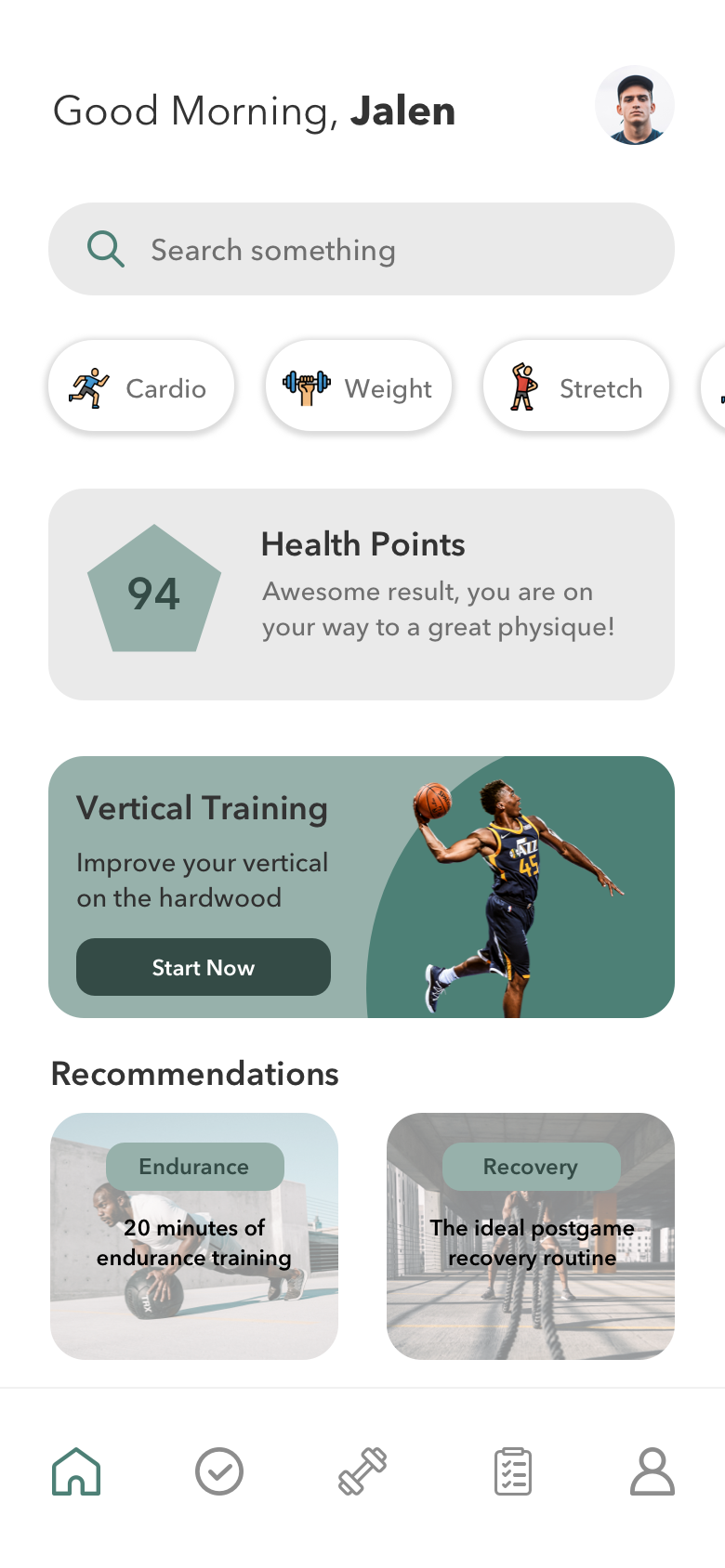
Home · schedule + today's session
The Home screen frames the training week as a single object. Today's session first, the rest of the week as context. The linework motif carried through from onboarding gives the app a consistent visual signature across screens.
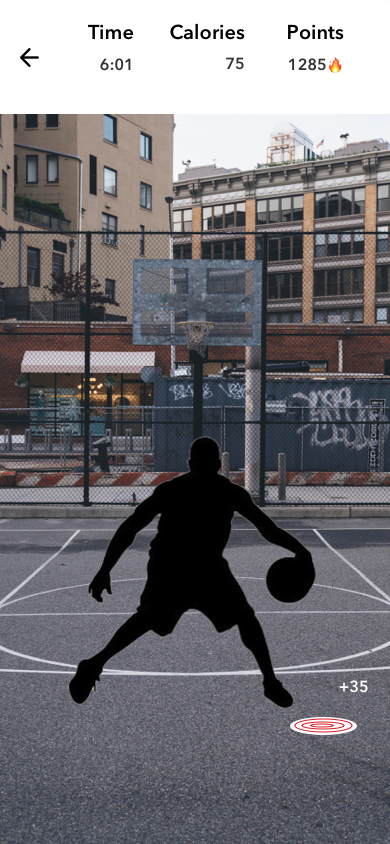
AR session · life-sized trainer in your space
The core interaction: point the camera at your floor, and a life-sized virtual trainer appears in the room, scaled to match your height. The session runs alongside the trainer, so you mirror a person in your space instead of watching a video.
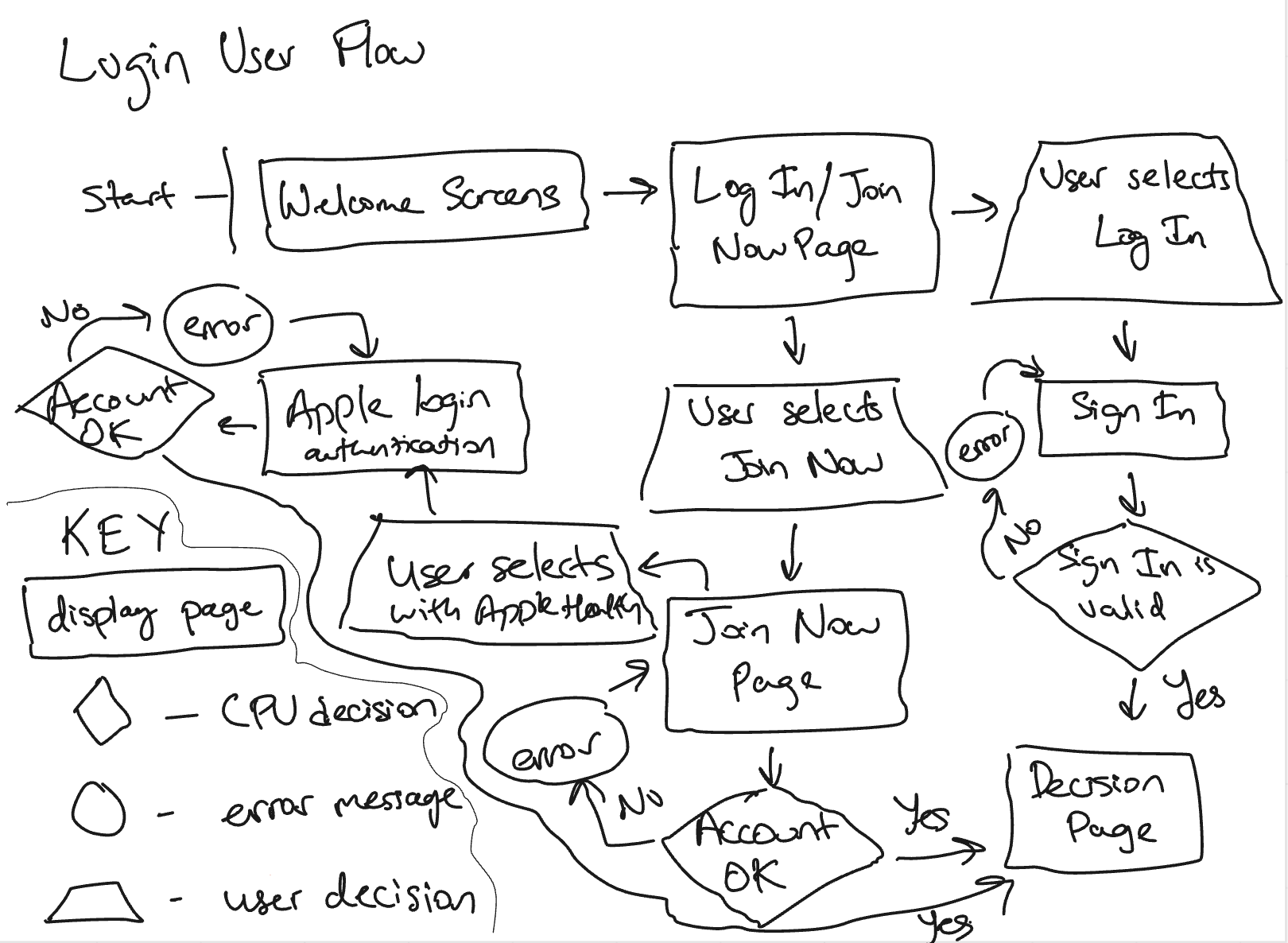
Product journey map
The end-to-end journey from first launch through onboarding, goal-setting, session, and recovery. Built early so every screen we designed after it had to fit somewhere on the map.
Results
A defensible capstone, and a working thesis about AR fitness.
15+
user interviews
1:1
life-sized AR trainer
6
core functionalities scoped
trainAR shipped as a capstone: a full research trail, a product journey map, low-fi and hi-fi flows, and a defensible thesis about where AR belongs in fitness. It never launched, but the decisions are backed by the interviews and testing I did.
The AR trainer depended on hardware and ML that weren't shippable in 2021. The plan named that head-on: object recognition, body-motion detection, lighting constraints, and full-body tracking as the next frontier. The bet was that once that stack matured, the interaction model would still hold: trainer in your space, guidance in the moment, a program around the session.
Next case study
A camping companion that respects the trail
Camp on the Go · Personal project